Black Friday
24 Inch 1080P lcd monitor, $99
iphone 5c for $49
Itunes gift card for $40, $50 credit
Chromecast for $29 - youtube, netflix, hbo go, hulu+, pandora, and more on your TV
Touch screen 16" laptop, $380
ThinkGeek sale, +20% off discount already
65" Samsung LCD, $999
Cyber Monday
17" with haswell chipset, 1600x900 lcd, $399
Friday, November 29, 2013

Sunday, March 3, 2013
Distribute updates for events, causes, and crisises
I was asked by family to help setup a way to communicate information updates and co-ordinating support for my Aunt.
At first, I thought twitter was the answer, however it didn't cover all the needs.
The basic issue is most people use Facebook, and any solution that didn't involve facebook seemed less fluid and practicle.
I will make a post about why this is a better alternative to caringbridge.org.
The solution was a combination of Twitter and Facebook, it seems to be the sweetspot for the communication needs.
Information Flow
The solution was to allow my cousin to upate instantly by simply texting updates from her cell phone to 40404. (USA twitter number) The message is posted immediately on twitter, and people with cell phones can get instant updates, with email immediately sent to those who subscribe.
My cousin created a facebook page for updates for my aunt, and those on facebook can like the page for updates for immediate information. Facebook also provides an outlet for family and friends to post pictures, videos, and co-ordinate support.
What it lacks
The downside to the system is everyone gets the same news at the same speed, immediately. There may be need to distribute information to two levels, very close family and friends and public. People on cell phones and emails must go to facebook for community support organization.
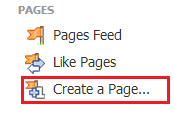 Facebook Page
Login to facebook and on the right hand side of your home page click create a page. Follow on screen directions, click here for more information.
Name the page something unique and easy to find, like "Supporting First LastName". Invite at first only couple of close people to test out.
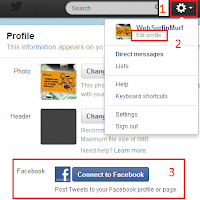
Connecting Twitter
Create a twitter account following these steps (click). In the upper right hand corner of twitter click the gear icon and click edit profile. On the profile page, click the facebook icon at bottom of page.
You may be prompted to log into facebook, and you will be asked by facebook to allow twitter to repost tweets to facebook. Click agree.
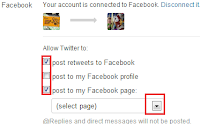 You will be brought back to the edit profile page. To redirect posts ONLY to your facebook page (not your personal wall) be sure to UNCHECK post to my facebook profile and CHECK post to my facebook page. Use drop down to select the facebook page. Follow directions to save/exit edit profile.
Issue a tweet and confirm its working!
Connecting the Community
Facebook, email, and/or call to get the word out about the new social support system. Recommend first tweets be how to connect cell phones and connect email to make sure its readily available to everyone.
For email, here is a sample set of directions, requires personalization.
The solution was a combination of Twitter and Facebook, it seems to be the sweetspot for the communication needs.
Information Flow
The solution was to allow my cousin to upate instantly by simply texting updates from her cell phone to 40404. (USA twitter number) The message is posted immediately on twitter, and people with cell phones can get instant updates, with email immediately sent to those who subscribe.
My cousin created a facebook page for updates for my aunt, and those on facebook can like the page for updates for immediate information. Facebook also provides an outlet for family and friends to post pictures, videos, and co-ordinate support.
What it lacks
The downside to the system is everyone gets the same news at the same speed, immediately. There may be need to distribute information to two levels, very close family and friends and public. People on cell phones and emails must go to facebook for community support organization.
How to setup
Facebook PageLogin to facebook and on the right hand side of your home page click create a page. Follow on screen directions, click here for more information.
Name the page something unique and easy to find, like "Supporting First LastName". Invite at first only couple of close people to test out.

Connecting Twitter
Create a twitter account following these steps (click). In the upper right hand corner of twitter click the gear icon and click edit profile. On the profile page, click the facebook icon at bottom of page.
You may be prompted to log into facebook, and you will be asked by facebook to allow twitter to repost tweets to facebook. Click agree.
 You will be brought back to the edit profile page. To redirect posts ONLY to your facebook page (not your personal wall) be sure to UNCHECK post to my facebook profile and CHECK post to my facebook page. Use drop down to select the facebook page. Follow directions to save/exit edit profile.
Issue a tweet and confirm its working!
Connecting the Community
Facebook, email, and/or call to get the word out about the new social support system. Recommend first tweets be how to connect cell phones and connect email to make sure its readily available to everyone.
For email, here is a sample set of directions, requires personalization.
Hello everyone,
We have setup a facebook page for [name], to help everyone keep updated on latest information.
Updates to Facebook, follow these steps.
1) log into facebook
2) search for [pagename]
3) click like
Updates to your cell phone, follow these steps.
1) Send a text message "START" to 40404. (USA)
2) Twitter will text back, send text of your full name.
3) Twitter will text back your twitter username
4) Send text "Follow [twittername]" to 40404. (USA)
Update from email, follow these steps.
1) Login to twitter (follow signup directions if new user)
2) Go to http://Twitter.com/[twittername]
3) Find the follow button on right side and click to follow.
4) Click on the gear icon in upper right hand corner
5) Select settings from drop down menu
6) Click on Email Notifications on left hand side.
7) Check notification boxes to reflect your email preferences.
8) Click Save changes.
Closing Thoughts
It is important for communication as much for family and friends to have an outlet, as it is for the person who needs support. Same approach above could also be done for event, crisis, and cause co-ordination.
I was somewhat uncomfortable creating this post, due to the personal circumstances. To figure out the right combination to ensure it is easy for people to communicate and share was sadly very difficult using the services I could find on the internet. My hope is this post will make it easier for others.
I still don't like how complex the email connecting is for non-twitter users. It is possible to setup a gmail account and have emails from twitter hit that acccount, and have a gmail rule to forward to a personal distribution list. Then the person issuing tweets can manage those who get automated emails and not requiring people to do work.
I was somewhat uncomfortable creating this post, due to the personal circumstances. To figure out the right combination to ensure it is easy for people to communicate and share was sadly very difficult using the services I could find on the internet. My hope is this post will make it easier for others.
I still don't like how complex the email connecting is for non-twitter users. It is possible to setup a gmail account and have emails from twitter hit that acccount, and have a gmail rule to forward to a personal distribution list. Then the person issuing tweets can manage those who get automated emails and not requiring people to do work.
Sunday, February 24, 2013
Twitter Communication
I wrote this post for people who need to communicate to a wide variety of people using cell phone, email, web page, facebook, and other internet based options.
Twitter looks like the best option currently for providing widest variety of choices for information delivery. You can setup a twitter account for free, then have people subscribe to the information by their preference.
If the twitter account is public, the web site can also serve as a current web site giving full history and current information. You can see an example by viewing my own account here, (click) To get your own home page, simply click on your user name after logging into twitter.com and copy the URL after clicking.

Follow create Account(click) process make your account private(click) .
Once setup, you can copy/paste the directions below to subscribe everyone to your feed, just the techie part. Remove any references to web page if you make the page private. Full directions for Twitter can be found here for registration, following, email notification, and to connect your tweets to publish on facebook.
Be sure to replace [PUT NAME HERE] with the twitter account name.
--------------------------------------------------------------------------------------------------------
I will be relaying information using the Twitter.com service. You can get updates by viewing a web page, SMS on your phone, email, tablet, smartphone, or Facebook.
Twitter by cell phone - SMS
How to sign up for a new Twitter account via SMS:
Send a text message with the word START in the USA to 40404
Twitter will send you a reply and ask you to reply back with your full name to sign up.
Twitter will then send a message back to you and assign you a username based on your full name.
You're all set. Send a text message and it will post as your first Tweet!
How to follow via SMS/text message:
Send a text with the words Follow [PUT NAME HERE] in an SMS (text message) to 40404 (USA) to start following someone from your mobile phone.
You will receive a confirmation text letting you know you are now following that user.
Outside USA, http://tinyurl.com/newtwitte
Twitter by Web Browser
Twitter looks like the best option currently for providing widest variety of choices for information delivery. You can setup a twitter account for free, then have people subscribe to the information by their preference.
If the twitter account is public, the web site can also serve as a current web site giving full history and current information. You can see an example by viewing my own account here, (click) To get your own home page, simply click on your user name after logging into twitter.com and copy the URL after clicking.
Follow create Account(click) process make your account private(click) .
Be sure to replace [PUT NAME HERE] with the twitter account name.
--------------------------------------------------------------------------------------------------------
I will be relaying information using the Twitter.com service. You can get updates by viewing a web page, SMS on your phone, email, tablet, smartphone, or Facebook.
Twitter by cell phone - SMS
How to sign up for a new Twitter account via SMS:
Send a text message with the word START in the USA to 40404
Twitter will send you a reply and ask you to reply back with your full name to sign up.
Twitter will then send a message back to you and assign you a username based on your full name.
You're all set. Send a text message and it will post as your first Tweet!
How to follow via SMS/text message:
Send a text with the words Follow [PUT NAME HERE] in an SMS (text message) to 40404 (USA) to start following someone from your mobile phone.
You will receive a confirmation text letting you know you are now following that user.
Outside USA, http://tinyurl.com/newtwitte
Twitter by Web Browser
Create an account
Go to http://twitter.com, follow onscreen directions.
After create account process completes, find email by twitter and click the link to confirm account.
Go to http://twitter.com and log in with TwitterID and password.
Follow user
Go to http://Twitter.com/[PUT NAME HERE]
Find the follow button on right side and click.
Get updates via Email
Login to twitter.com, click on the gear icon in upper right hand corner
Select settings from drop down menu
Click on Email Notifications on left hand side.
Check or un-check the notification boxes to reflect your email preferences.
Click Save changes.
Get updates via facebook
Login to facebook, click on your name in upper left hand corner.
On your home page, the facebook URL at top shows your facebook name.
Have Twitter send messages to email at @facebook.com
Twitter by SmartPhone/Tablet
For most other devices, need to install twitter application on device.
For details, click here: http://tinyurl.com/FollowTwitte
For details, click here: http://tinyurl.com/FollowTwitte
Saturday, May 28, 2011
Old Game Videos
This post is a collection of computer games I very much enjoyed when released.
Company of Heroes - 2006
Looking at them now, they where more simplistic than today's games.
But at the time, they where cutting new ground, in game types, play capability, and sometimes graphics.
A theme about all these games are multi-player, RTS games. I may do a different post for FPS and other multi-player games. Most of the god games (populous, Dungeon Keeper) were NOT good multi-player games...but I tried to play them. :)
M.U.L.E. - 1983
Populous - 1989
PowerMonger - 1990
Spaceward Ho! - 1990
Magic Carpet - 1994
Warcraft II - 1995
Command And Conquer - 1995
Dungeon Keeper 1997
Age of Empires - 1997
Populous 3 - 1999 - Revolutionary scale, last great god game.
StarCraft - 2000
WarCraft 3 - 2002, WC3 and WC2 listed, since WC3 introduced heros, revolutionizing RTS
Friday, November 27, 2009
Christmas 2009 Sales
Look at this site to find best sales for Christmas 2009 shopping and year round:
DealNews
Before ordering on any site, check this site for coupons to add additional discounts.
DealCoupon
Before going to the mall, check this site out for printable coupons.
Wow Printable Coupons
Electronics
New Egg Black Friday
Home Depot Sale
Dell Sale
DealNews
Before ordering on any site, check this site for coupons to add additional discounts.
DealCoupon
Before going to the mall, check this site out for printable coupons.
Wow Printable Coupons
Some Black Friday 2009 notable sales:
Electronics
New Egg Black Friday
Home Depot Sale
Dell Sale
- Vizio 32" LCD 1080P TV for $399
- Laptop 10" Windows XP, 1 GB RAM, 160GB HD, no DVD, for $249
- Basic Desktop PC, Vista, 2GB RAM. 250GB HD, DVD, for $199
- 22" Monitor, 1080P, for $144
Sunday, September 20, 2009
HP DreamScreen
NEW picture frame that looks better than the previous frame I liked.
Watch the video of the frame:
10" $249, 13" - $299
Watch the video of the frame:
10" $249, 13" - $299
Friday, May 15, 2009
Wolfram Search Engine
Stephen Wolfram, maker of Mathematica, has created a tool that is a milestone that harnesses vast amounts of data and makes it easily "computeable" from basic English questions.
I can see this as being like the launch day of Google, the next step in information harnessing. It has huge potential in science and general data research/analysis.
Below is a quick 13 minute walkthrough if this new tool. If you don't know about the Wolfram search engine, this is a MUST watch.
I will guess Google will crush him in due time.
The search engine launches TODAY, May 15th, 2009
http://www.wolframalpha.com/index.html
I can see this as being like the launch day of Google, the next step in information harnessing. It has huge potential in science and general data research/analysis.
Below is a quick 13 minute walkthrough if this new tool. If you don't know about the Wolfram search engine, this is a MUST watch.
I will guess Google will crush him in due time.
The search engine launches TODAY, May 15th, 2009
http://www.wolframalpha.com/index.html
Tuesday, May 5, 2009
Virus Protection and fixing
Assuming your system does NOT have a virus infection, but you are looking to protect your Windows PC, below are the three programs I recommend to ensure full protection.
Protect your system
1) AVG Virus Scanner - Free Edition , you can pay for the premium edition, but the basic should be fine. This program protects from Viruses, but not malware or trojan horses.
2) Spybot or Defender
Spybot Search and Destroy - Protects your Windows PC from malware or trojan horses. Has real-time protection. Unfortunately it is a bit chatty, and the end user may be confused by the pop-ups. Lesser protection, but easier for end users is:
MicroSoft Defender - Protects your Windows PC from malware or trojan horses. Seems less diligent than Spybot at protecting your system, but significantly less chatty. Good for people easily confused by tech.
Also I STRONGLY recommend not using MicroSoft internet explorer for web browsing, instead use FireFox. In addition, do NOT use Microsoft outlook, use Gmail. Gmail can get your "pop3" or normal email from your ISP provider.
NOTE: I am eager to switch from AVG to ClamWin, when Clamwin supports real-time virus protection.
Already Infected? Traditional Steps to fix
So your infected eh? Not sure what you got?
I recommend skipping to 5 and create a boot disk. I'll blog how to do this in greater detail on another post.
Otherwise, the traditional assault list.
*NOTE* With some viruses this still may not get rid of it. Some viruses can hide on the hard drive after a format. To be 100% sure you are virus clean, toss the existing hard drive and install a new hard drive.
Protect your system
1) AVG Virus Scanner - Free Edition , you can pay for the premium edition, but the basic should be fine. This program protects from Viruses, but not malware or trojan horses.
2) Spybot or Defender
Spybot Search and Destroy - Protects your Windows PC from malware or trojan horses. Has real-time protection. Unfortunately it is a bit chatty, and the end user may be confused by the pop-ups. Lesser protection, but easier for end users is:
MicroSoft Defender - Protects your Windows PC from malware or trojan horses. Seems less diligent than Spybot at protecting your system, but significantly less chatty. Good for people easily confused by tech.
Also I STRONGLY recommend not using MicroSoft internet explorer for web browsing, instead use FireFox. In addition, do NOT use Microsoft outlook, use Gmail. Gmail can get your "pop3" or normal email from your ISP provider.
NOTE: I am eager to switch from AVG to ClamWin, when Clamwin supports real-time virus protection.
Already Infected? Traditional Steps to fix
So your infected eh? Not sure what you got?
I recommend skipping to 5 and create a boot disk. I'll blog how to do this in greater detail on another post.
Otherwise, the traditional assault list.
- Install Spybot and run.
Other utilities you can try is:
Ad Aware - Install virus scanner (AVG?) and run
Other utilities you can try is:
Trend MicroHousecall - Try to determine if infected. If unsure, go to web site and try to run online scanners. If you cannot run the online scanners, chances are your virus is blocking you.
TrendMicro Online scanner for virus, spyware, and malware *Firefox Friendly!
Kaspersky online scanner for virus & spyware
F-Secure online scanner for viruses only - Still screwed up? If your a Techie download and run HiJackThis! A tool that helps you identify where your problems are. See tuturial here, and site to help analyze logs here.
- Ready to throw in the towel? Time to get down and dirty. These are programs that create boot CD's to analyze your PC. This avoids booting an infected system, and thereby activating the virus/malware.
Ultimate Boot Disk for Windows - Absolutely the best Windows utility disk. And its FREE!.
F-Secure - Linux boot disk to find viruses
Avira - Linux boot disk to viruses and malware
Dr. Web Live CD - I haven't tried yet - The virus is gone, but windows was broken by step 5? Two programs to help. First it is important to have a windows Installation Disk that matches your Service Pack. To upgrade your older Windows XP Installation disk to Service Pack 3. Follow these directions on how to use a program called nLite to make your new Windows XP Installation CD.
Once you have a spanking new Installation CD, read up on how to run a repair installation.
If you need to boot windows from a CD, to copy off critical files before reinstalling windows, check out Ultimate Boot CD, based on Bart PE. UBCD llows you to take a windows CD and create a bootable windows CD, and auto-install a wide variety of utilities. Of course you need a working windows machine with a CD burner to do so. :) - The final step, the big one. If you STILL can't get rid of the virus and/or your machine is toast. Back up all data you can using BartPE or UBCD above. Once backed up, use windows installation disk to format the entire drive and do a clean installation of Windows XP.
*NOTE* With some viruses this still may not get rid of it. Some viruses can hide on the hard drive after a format. To be 100% sure you are virus clean, toss the existing hard drive and install a new hard drive.
Tuesday, March 10, 2009
Internet TV
Internet TV is now here. All that is missing is a portal that unifies all the GREAT content available on TV. I already posted about Twit.TV, a channel I listen to daily through my iPhone. It's the best tech channel bar none.
I'll update this blog entry as I find more sites that have great Internet TV content available.
Truveo.com - Search engine to find video content on the web
Hulu.com, TV.com , Fancast.com, Veoh.com, TV, movies, you name it, all available with short commercials. The "buzz" in online TV. TV.com available on iphone
Crackle.com - Unique from the pack, has some good original web-only content.
CBS.com , NBC.com , ABC.com, Fox.com , you guessed it, major network content on the web.
SciFi.com, ComedyCentral.com, MTV.com, Some of the many cable networks with video available on the net
CNBC.com, CNN.com, Bloomberg.com, Live News Video
NetFlix.com , Amazon.com , itunes.com , MovieFlix.com - Pay services offering streaming video
Boxee.tv - A front end program to unify everything above. A must for a livingroom PC.
A funny series available on Crackle.com, linked episode one below.
I'll update this blog entry as I find more sites that have great Internet TV content available.
Truveo.com - Search engine to find video content on the web
Hulu.com, TV.com , Fancast.com, Veoh.com, TV, movies, you name it, all available with short commercials. The "buzz" in online TV. TV.com available on iphone
Crackle.com - Unique from the pack, has some good original web-only content.
CBS.com , NBC.com , ABC.com, Fox.com , you guessed it, major network content on the web.
SciFi.com, ComedyCentral.com, MTV.com, Some of the many cable networks with video available on the net
CNBC.com, CNN.com, Bloomberg.com, Live News Video
NetFlix.com , Amazon.com , itunes.com , MovieFlix.com - Pay services offering streaming video
Boxee.tv - A front end program to unify everything above. A must for a livingroom PC.
A funny series available on Crackle.com, linked episode one below.
From Crackle:
Thursday, January 1, 2009
The Best Digital Picture Frame
 I have been watching digital picture frames for years, waiting for the "perfect" one to come along.
It has arrived, and it is called the Kodak EasyShare W820 (click for Kodak Site)
Let me highlight the features
- Has 8" Bright Vibrant LCD display, with frame border colors of White, deep red, or grey.
- Connect to your Wi-Fi network, allowing new photos to be streamed to the frame (Supports WPA2)
- Easy to configure and change the Picture settings frame by touching NEXT to the screen (around the edge)
- Picture Frame can connect to your Flickr, or ANY RSS picture feed
- SD Expansion slot for storing/displaying locally stored content
- Can play movies, music, wide variety of picture formats, RSS news feeds, weather, etc.
- Windows based software to assist in easy configuration
Once you have Flickr setup, with pictures uploaded, you can create picture "sets" to allow you to organize the pictures. Using Flickr, you can create Flickr "contact list" of trusted friends and family, allowing each other to see pictures.
From your picture frame, using the touch screen border, you can choose which picture sets you have to display, or a friends/family picture set, or an RSS feed (such as from Picassa).
The display pictures can be set from 3 seconds up to 1 hour between picture changes. The frame can be scheduled what time to turn on and off, example from 7am to 11pm turn on.
I have had the frame operating for less than a day, and it has already surpassed my expectations. I purchased 4 frames for $129.00 each with free shipping on 12/1/08 from Kodak direct.
Be sure to get the EXACT same model, Kodak EasyShare W820 or W1020 (I assume it has the same features, but a 10" screen). Kodak has a wide variety of frames, the W820 is the one to get.
As of 1/1/09, the frame is available for $138 + shipping and tax at Beach Audio.
If you purchase this frame, email me, we can exchange Flickr info!
Tuesday, December 30, 2008
Download Youtube and other video
The web site:
http://vixy.net/
Will allow you to download video from sites and save them in another format for later viewing.
Pretty nifty stuff
http://vixy.net/
Will allow you to download video from sites and save them in another format for later viewing.
Pretty nifty stuff
Monday, December 29, 2008
Internet Geek TV - TWIT TV
Back in 1999, There was a cable channel called "TechTV".
Tech TV was by far the best techie channel and shows ever created.
Then Comcast came along and Crushed it in 2004, as a matter of fact I was watching the channel at 2 am when it turned off, unexpectedly, never to be seen again. The shows merged into channel G4 are total fluff.
The main person on Tech TV was Leo Laporte. He now has a internet based "tv" type channel available at:
http://live.twit.tv/
They have a calendar posting their show schedule by clicking here.
This is my primary TV viewing now, on my secondary monitor.
Yea, geek.
The tech they use is through a site called stickAM, where ANYONE can create their own chat/video broadcasts for others to join.
UPDATE 1/7/9 Read more at this article by clicking here.
For your Viewing pleasure, is TWIT TV embedded link below
Tech TV was by far the best techie channel and shows ever created.
Then Comcast came along and Crushed it in 2004, as a matter of fact I was watching the channel at 2 am when it turned off, unexpectedly, never to be seen again. The shows merged into channel G4 are total fluff.
The main person on Tech TV was Leo Laporte. He now has a internet based "tv" type channel available at:
http://live.twit.tv/
They have a calendar posting their show schedule by clicking here.
This is my primary TV viewing now, on my secondary monitor.
Yea, geek.
The tech they use is through a site called stickAM, where ANYONE can create their own chat/video broadcasts for others to join.
UPDATE 1/7/9 Read more at this article by clicking here.
For your Viewing pleasure, is TWIT TV embedded link below
NEW computer deals!
Laptop 14" screen, 2 GB RAM, Dual Core 2 GHZ, Windows Vista $399 - NO REBATES
10.1" Wide screen Notebook, 1GB RAM, 120GB web cam, Windows XP Home $289.99 + $13 Shipping
15.4" Wide screen DELL Intel Core 2 Duo 1.8GHz 2GB RAM, dual layer DVD burner, Windows Vista Basic, $499
Intel Dual-Core T3200 2GHz processor, 15.4" wide screen, 3GB RAM, 250GB, 802.11g/n wireless, Windows Vista Home $599.99
10.1" Wide screen Notebook, 1GB RAM, 120GB web cam, Windows XP Home $289.99 + $13 Shipping
15.4" Wide screen DELL Intel Core 2 Duo 1.8GHz 2GB RAM, dual layer DVD burner, Windows Vista Basic, $499
Intel Dual-Core T3200 2GHz processor, 15.4" wide screen, 3GB RAM, 250GB, 802.11g/n wireless, Windows Vista Home $599.99
Sunday, December 28, 2008
Hate talking to a computer phone system?
If you hate talking to computer phone system, this web site will be one of your favorites.
The web site "gethuman" lists many top USA based companies showing what keys you must press to BYPASS their voice computer system.
http://gethuman.com/
The web site "gethuman" lists many top USA based companies showing what keys you must press to BYPASS their voice computer system.
http://gethuman.com/
Tuesday, December 23, 2008
Christmas Sale Info
I'll update this through this week, some current great prices:
TV
32” LCD TV (only 720P) for $350 (Rebates + 40 bucks shipping, 390)
32" LCD TV (720-) for 420 with shipping, no rebates
Computer Monitor
22" LCD 1680x1050 5ms response for 140
24” 1920x1200 with 5ms response for 250
TV
32” LCD TV (only 720P) for $350 (Rebates + 40 bucks shipping, 390)
32" LCD TV (720-) for 420 with shipping, no rebates
Computer Monitor
22" LCD 1680x1050 5ms response for 140
24” 1920x1200 with 5ms response for 250
Monday, December 1, 2008
Social Networking and Internet based news
The web has evolved into an online community where people share pictures, movies, thoughts (blogs), and opinions through various web sites.
Youtube is the site for sharing videos, allowing users to embed video streaming into their own web sites hosted by youtube.
Flickr is "the" site for sharing pictures.
Digg is "the" site for people scouring the web with worthy news to share, and voting for articles to surface for us to read.
Pandora and last.fm are both popular sites for streaming music to you by using tailored playlists.
I found a site that agregates all the popular buzz sites information to one page, for at-a-glance to see what the daily buzz is on the net for you to read, called popurls.
Whether your "hip" with the latest web buzz or not, check out popurls, you'll be glad you did.
Youtube is the site for sharing videos, allowing users to embed video streaming into their own web sites hosted by youtube.
Flickr is "the" site for sharing pictures.
Digg is "the" site for people scouring the web with worthy news to share, and voting for articles to surface for us to read.
Pandora and last.fm are both popular sites for streaming music to you by using tailored playlists.
I found a site that agregates all the popular buzz sites information to one page, for at-a-glance to see what the daily buzz is on the net for you to read, called popurls.
Whether your "hip" with the latest web buzz or not, check out popurls, you'll be glad you did.
Saturday, November 29, 2008
After Black Friday Deals
Laptop
Click here for current Laptop deals
Acer 13" Laptop, Windows Vista, DVD, $399
MSI 10" Laptop, windows XP, $330
HP 15" Windows Vista Laptop, $499.99 w/mail-in rebate (Black Friday Laptop better processor, still good for price)
HP 15" Windows Vista Laptop, $599.00 with free shipping (no rebate)
Lenovo (IBM laptop maker) laptops from 400-550 (GREAT sale)
7" Laptop with Windows XP for $250 - TINY screen, TINY hard drive, and a crappy CPU to boot, but it is only 250 (ATOM cpu better)
PC Desktop
Click here for PC Desktop deals
Dell desktop windows vista $299 (no monitor, sale through Christmas)
Dell dekstop Windows Vista 349 (better processor, more RAM & Disk)
Dell Windows Vista Intel Dual Core 2GHz Desktop PC with 20" LCD - $396 shipped
Dell refurbished one XPS for $517 (pretty good deal for all-in-one pc)
TV
Current TV deals (click here)
32" 720p (NOT 1080P) TV $380
32" 720p LCD tv w/ipod dock $400
32" Screen 1080P for $590
Printer
Brother all in one printer wireless printer $80 (shipping delayed)
All in one wireless printer/fax/scanner/phone brother - $149
Kid Toys
Click here for wide variety of kid toys on sale
Click here for current Laptop deals
Acer 13" Laptop, Windows Vista, DVD, $399
MSI 10" Laptop, windows XP, $330
HP 15" Windows Vista Laptop, $499.99 w/mail-in rebate (Black Friday Laptop better processor, still good for price)
HP 15" Windows Vista Laptop, $599.00 with free shipping (no rebate)
Lenovo (IBM laptop maker) laptops from 400-550 (GREAT sale)
7" Laptop with Windows XP for $250 - TINY screen, TINY hard drive, and a crappy CPU to boot, but it is only 250 (ATOM cpu better)
PC Desktop
Click here for PC Desktop deals
Dell desktop windows vista $299 (no monitor, sale through Christmas)
Dell dekstop Windows Vista 349 (better processor, more RAM & Disk)
Dell Windows Vista Intel Dual Core 2GHz Desktop PC with 20" LCD - $396 shipped
Dell refurbished one XPS for $517 (pretty good deal for all-in-one pc)
TV
Current TV deals (click here)
32" 720p (NOT 1080P) TV $380
32" 720p LCD tv w/ipod dock $400
32" Screen 1080P for $590
Printer
Brother all in one printer wireless printer $80 (shipping delayed)
All in one wireless printer/fax/scanner/phone brother - $149
Kid Toys
Click here for wide variety of kid toys on sale
Wednesday, November 26, 2008
Black Friday Deals 2008
This year I'll post links to Black Friday deals, and highlight items that are well priced, but I will NOT post deals that are very limited quantities.
Black Friday Sales
DealNews - listing of all web sites deals
http://gizmodo.com/tag/black-friday/
Dell deals
Amazon Black Friday deals
laptop/desktop
Current Laptop deals
*NOTE: for dells, when possible pay to upgrade lcd screen
9" laptop linux great for web browsing, (not windows) - $250
9" laptop windows xp home 1gb ram, 160 gb hd $329
10" laptop linux 1gb ram, 40 gb ssd $399 6 hour battery life
15" HP laptop windows vista $499
15" dell laptop windows vista - $349 (hp better laptop)
Acer desktop windows vista $299
Dell desktop windows vista $299
Dell desktop with 22" screen $460
computer accessories/monitors
24" LCD computer monitor 1080p (1900x1200) - $200
22" lcd monitor for $129
other electronics
All in one wireless printer/fax/scanner/phone brother - $149
Garmin nuvi 360 navigator $169
Wii bundle for 399. price ok, but it is in stock
42" lcd tv - NOTE highest resolution 720p (about 1/2 as sharp as 1080p) $499
top of the line technical specification lcd tvs
http://www.newegg.com/Product/Product.aspx?Item=N82E16889102208
http://www.newegg.com/Product/Product.aspx?Item=N82E16889102198
http://www.newegg.com/Product/Product.aspx?Item=N82E16889102201
Black Friday Sales
DealNews - listing of all web sites deals
http://gizmodo.com/tag/black-friday/
Dell deals
Amazon Black Friday deals
laptop/desktop
Current Laptop deals
*NOTE: for dells, when possible pay to upgrade lcd screen
9" laptop linux great for web browsing, (not windows) - $250
9" laptop windows xp home 1gb ram, 160 gb hd $329
10" laptop linux 1gb ram, 40 gb ssd $399 6 hour battery life
15" HP laptop windows vista $499
15" dell laptop windows vista - $349 (hp better laptop)
Acer desktop windows vista $299
Dell desktop windows vista $299
Dell desktop with 22" screen $460
computer accessories/monitors
24" LCD computer monitor 1080p (1900x1200) - $200
22" lcd monitor for $129
other electronics
All in one wireless printer/fax/scanner/phone brother - $149
Garmin nuvi 360 navigator $169
Wii bundle for 399. price ok, but it is in stock
42" lcd tv - NOTE highest resolution 720p (about 1/2 as sharp as 1080p) $499
top of the line technical specification lcd tvs
http://www.newegg.com/Product/
http://www.newegg.com/Product/
http://www.newegg.com/Product/
Monday, September 8, 2008
Digital Music & Audio Books
There are many forms of Music available on the internet, below are some of my favorites:
Download Music for phone or PC
Buy or download FREE Mp3's without DRM from Amazon (click here)
Of course, iTunes music store by Apple (click here)
Audio Books
Download DRM Audio books for a wide variety of devices at Audible.com (I use this all the time)
Royalty FREE legal book downloads at:
http://librivox.org/
http://www.gutenberg.org/browse/categories/1
Online Radio Stations
My favorite: Personalize your own radio station. Pandora plays music based on your preferences
Online Radio stations by AOL
Last.FM - Music recommended by users (social networking)
Satellite Radio
If you own XMRadio for your car, listen online for free!
If you own Sirius radio for your car, listen online for free!
Buy CD's
You can't beat Amazon for selection and prices
Local Radio stations
Locate local radio stations, listen online
Download Music for phone or PC
Buy or download FREE Mp3's without DRM from Amazon (click here)
Of course, iTunes music store by Apple (click here)
Audio Books
Download DRM Audio books for a wide variety of devices at Audible.com (I use this all the time)
Royalty FREE legal book downloads at:
http://librivox.org/
http://www.gutenberg.org/browse/categories/1
Online Radio Stations
My favorite: Personalize your own radio station. Pandora plays music based on your preferences
Online Radio stations by AOL
Last.FM - Music recommended by users (social networking)
Satellite Radio
If you own XMRadio for your car, listen online for free!
If you own Sirius radio for your car, listen online for free!
Buy CD's
You can't beat Amazon for selection and prices
Local Radio stations
Locate local radio stations, listen online
Tuesday, September 2, 2008
100 year record set for lack of Sun Spots in August
We talk so much about what Man does on earth, and debate what, if any effects we have on the environment/world. Global Warming, Pollution, mercury poisoning, etc.
Man's effect on the world is but small potatoes compared to what the cosmos can do to earth.
Lack of SunSpot activity has historically brought on Ice Age effects to earth.
And in August, the sun had no Sun Spots (possibly 1/2 a sun spot), first time in 100 years.
If this trend continues, rather than being worried the earth is too hot, it will be too cold!
How ironic then it is our pollution may help us fight cooling, if the sun's lack of spots becomes common place.
http://www.dailytech.com/Sun+Makes+History+First+Spotless+Month+in+a+Century/article12823.htm
Man's effect on the world is but small potatoes compared to what the cosmos can do to earth.
Lack of SunSpot activity has historically brought on Ice Age effects to earth.
And in August, the sun had no Sun Spots (possibly 1/2 a sun spot), first time in 100 years.
If this trend continues, rather than being worried the earth is too hot, it will be too cold!
How ironic then it is our pollution may help us fight cooling, if the sun's lack of spots becomes common place.
http://www.dailytech.com/Sun+Makes+History+First+Spotless+Month+in+a+Century/article12823.htm
Subscribe to:
Posts (Atom)